AirSim3D C 560XL Tutorial #2.1 Passenger Safety: Pressurization
AirSim3D
0:00 / 0:00
AirSim3D C 560XL Tutorial #2.1 Passenger Safety: Pressurization
1 192 просмотра · 2 г. назад
AirSim3D
284 подписчика
1 192 просмотра · 2 г. назад
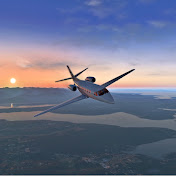
We begin Chapter 2 in our "Critical Systems" series of tutorials for the C-560XL, by first learning how to operate the life-saving system which enables everyone abord to stay virtually alive when its flying in the rarified atmosphere of its cruise altitudes that it calls home, while its flying its human pilots and guests high, and fast, and most importantly, safely, to its destination.
Come aboard to learn how to fly and manage its completely realistic, and 100% authentic 3-mode pressurization system. And as you learn how to operate the system, you will also watch how to first recognize, assess, and then recover from life-threatening depressurization situations at various altitudes, all the way to get safely on the ground.
So leave your assumptions behind of how to pressurize this jet based on how its done "in other aircraft" -- if you wish to stay virtually alive at FL32 in the C-560XL; and remember the 2 zeros!
Goes without saying that as a result of creating scenes to demonstrate this critical system, you will therefore also see examples of its industry-leading 3D lighting, superior real-world recorded FMOD sounds, and see its strong attention to object, shading, labeling, coloring, and texturing detail at various points while the tutorial plays out.
Credit to die4Foods for the Chowder image. (what??? ...Clam chowder in an Aircraft tutorial??? ... hhhmm... watch the video for context, it'll make sense)
*PS:*
We realize we neglected to demonstrate what the little red (cherry picker) switch does that's located top row, between the WHITE Mode switch on its left, and the RED Dump switch on its right.
That is a fully functional spring-loaded switch which can (in addition to the Dial) be used to change the SET ALT numbers when in MANUAL mode. Apologies for the omission.
