Amydor AMD8025D Digital Box Foil Printer|Full Operation Tutorial
Amydor Rachel
0:00 / 0:00
Amydor AMD8025D Digital Box Foil Printer|Full Operation Tutorial
56 просмотров · 2 недели назад
Amydor Rachel
65 подписчиков
56 просмотров · 2 недели назад
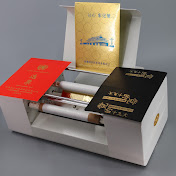
Complete step‑by‑step setup and operation tutorial for Amydor AMD8025D digital box foil printer.
At the beginning of this video, you will see real foil‑printed samples on gift boxes, shopping bags and packaging cases.
AMD8025D is specially‑designed for thick‑box foil printing.
✅ No printing plate needed, print directly from CorelDRAW, Illustrator or other design software.
✅ The print‑head can rise up to 350 mm, perfect for thick boxes and gift bags.
✅ USB connection, easy personalized gold, silver, holographic foil printing.
📋 Video chapters
00:00 Foil‑printing samples preview (boxes, bags & packaging)
00:35 01 Accessories Inspection
01:20 02 Remove shipping locking screws
02:12 03 Install Foils
02:41 04 Connect the Adapter and USB Cable
03:17 05 Install Driver
05:27 06 Start Printing
06:50 Finished foil‑printing results
Main Specifications:
Max printing thickness: 350mm
Max printing size: 57mm*220mm
Resolution: 300 DPI
Work with Windows system
If you are interested in our Amydor AMD8025D box foil printing machine, please contact us for catalog, price and more details.
WhatsApp:+8613622186569
Email: contact@amydor.com
#Amydor8025D #digitalboxfoilprinter #foilprintingmachine #goldfoilprintonbox #packagingprinting #giftbagprinting
