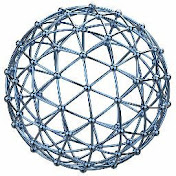
Exercise 94: How to make a 'Bubbly Ball' in Solidworks 2018
Easy CAD Solutions
0:00 / 0:00
Exercise 94: How to make a 'Bubbly Ball' in Solidworks 2018
5 365 просмотров · 2 г. назад
Easy CAD Solutions
65,1 тыс. подписчиков
5 365 просмотров · 2 г. назад
Did you like this video? Check 👉 https://easycadsolutions--learnsolidw... to attend a free SOLIDWORKS workshop.
In this workshop, you will discover the 10 best practices to become a SOLIDWORKS Pro in days (not years) without boring practice, expensive training classes, or any pointless theory.
@Easy CAD Solutions
Exercise 94 will teach you how to create this interesting 'Cubic Honeycomb Pattern' in Solidworks. After following this step-by-step video tutorial, you will learn to make this repeating circular pattern by making a precise instance and using surface loft effectively in Solidworks.
Important Commands Used:
-Surface Loft
-Reference Axis
-Reference Point
-Loft Boss/ Base
-Revolve Surface
-Surface Cut
-Split
-Delete/ Keep Body
-Move Face
-3D Sketch
-Move/ Copy Body (Point to Point Translation)
-Combine
-Offset Surface
-Extend Surface
-Circular Pattern
-Change Appearance
CAD File Link: Available Soon
Contact Info:(For Freelance Services)
WhatsApp: +919793662583
Email ID: nishant13071992@gmail.com
LinkedIn: / nishant-gautam-86253a100
