Section of a cone by an arbitrary plane
Drawing Board Fun
0:00 / 0:00
Section of a cone by an arbitrary plane
34 просмотра · 10 дн. назад
Drawing Board Fun
34 просмотра · 10 дн. назад
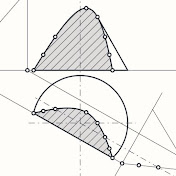
This video demonstrates the geometric construction of a section of a cone by an arbitrary plane. The task was executed using the drafting software available at DrawingBoard.Fun.
The video presents a step-by-step process of drafting the projections of a cone intersected by an arbitrary plane in a drawing application.
Initially, the basic projections of the solid are drawn: a front view in the shape of a triangle and a top view in the shape of a circle.
Next, an oblique line representing the cutting plane is drawn across the front view.
The following step involves determining and projecting the intersection points onto the top view using projection lines, which allows for drawing the cross-section curve on both views.
Finally, the resulting cross-section area is hatched, and all key construction points are labeled using numbers and primes (e.g., 1', 1'', 2', 2'').
