I Time Traveled to 1996: Installing & Playing Duke Nukem 3D on My Real Pentium 100MHz PC!
586RETRO PCs
0:00 / 0:00
I Time Traveled to 1996: Installing & Playing Duke Nukem 3D on My Real Pentium 100MHz PC!
6 885 просмотров · 10 месяцев назад
586RETRO PCs
36,5 тыс. подписчиков
6 885 просмотров · 10 месяцев назад
💾 We’re traveling back to 1996!
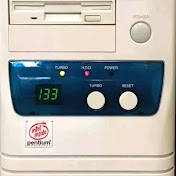
Today, I’m installing and playing Duke Nukem 3D — completely on my real Pentium 100 MHz PC from the 90s. No emulators. No virtual machines. Just pure retro silicon running one of the most legendary shooters ever made.
🖥️ Specs:
Intel Pentium 100 MHz
32 MB RAM
1 MB S3 Trio VGA
1700 MB HDD
Opti OPL3 ISA Sound Card
MS-DOS 6.22 + Windows 95 (optional)
⚡ In this video:
Installing Duke Nukem 3D from CD like it’s 1996
Configuring sound and graphics for perfect gameplay
Real-time loading screens, startup sounds, and CRT glow
Full gameplay test — does it still hold up in 2025?
🎮 Whether you grew up in the 90s or just love old-school PC builds, this is a true blast from the past.
📼 No emulators. No shortcuts. 100% genuine hardware.
Let’s see if this 30-year-old machine can still “kick ass and chew bubblegum”!
👉 Enjoying the retro vibes?
Like 👍, comment 💬, and subscribe 🔔 to join the Retro PC Revival — more classic installs, DOS setups, and forgotten games coming soon!
#RetroGaming #DukeNukem3D #MSDOS #RetroPC #Windows95 #ClassicPCGames
